
Để connect Store Woocomerce với Printuz, chúng ta thực hiện theo các bước sau :
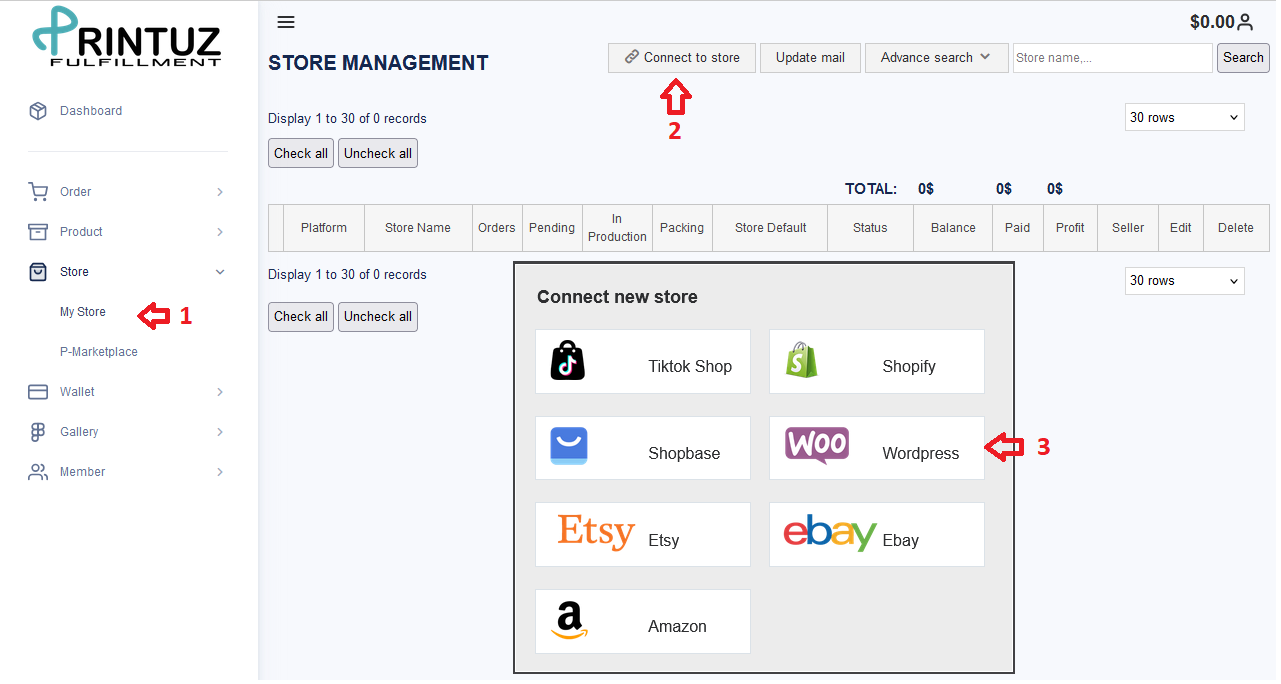
- Click vào Store > My store
- Connect to Store
- Chọn Woocomerce
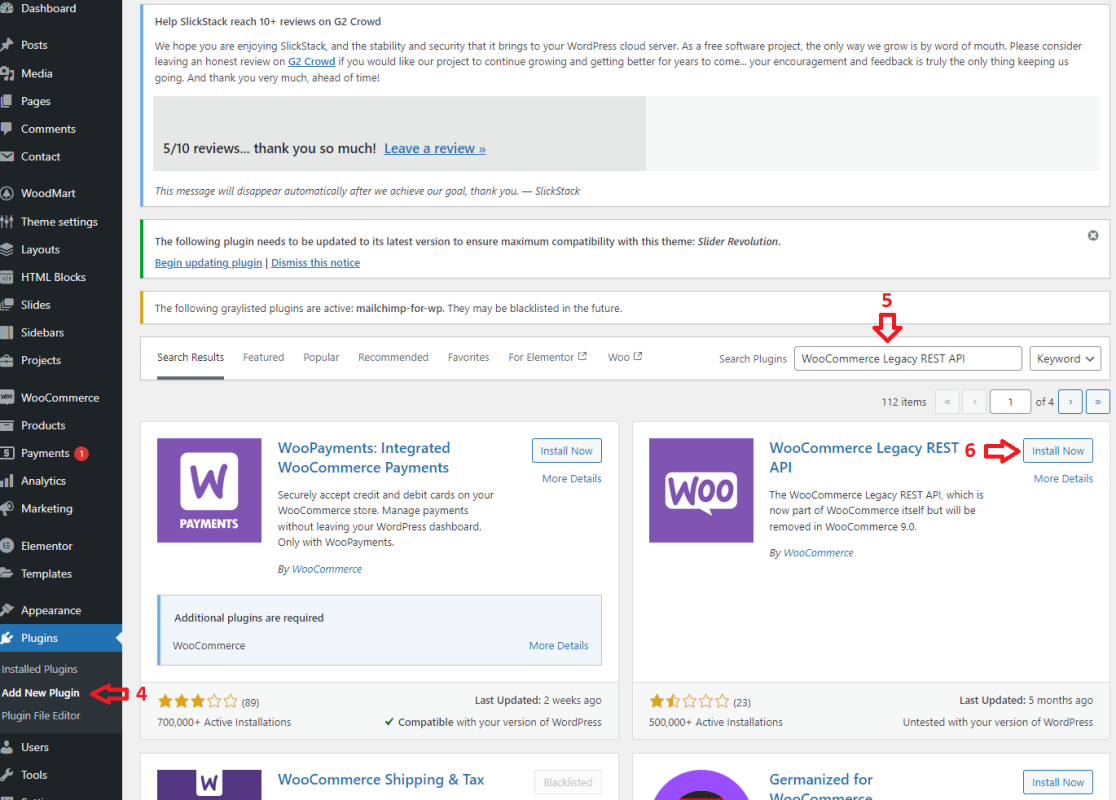
- Vào Woocomerce > Plugins > Add New Plugin
- Tìm Plugin : WooCommerce Legacy REST API
- Install now > Active
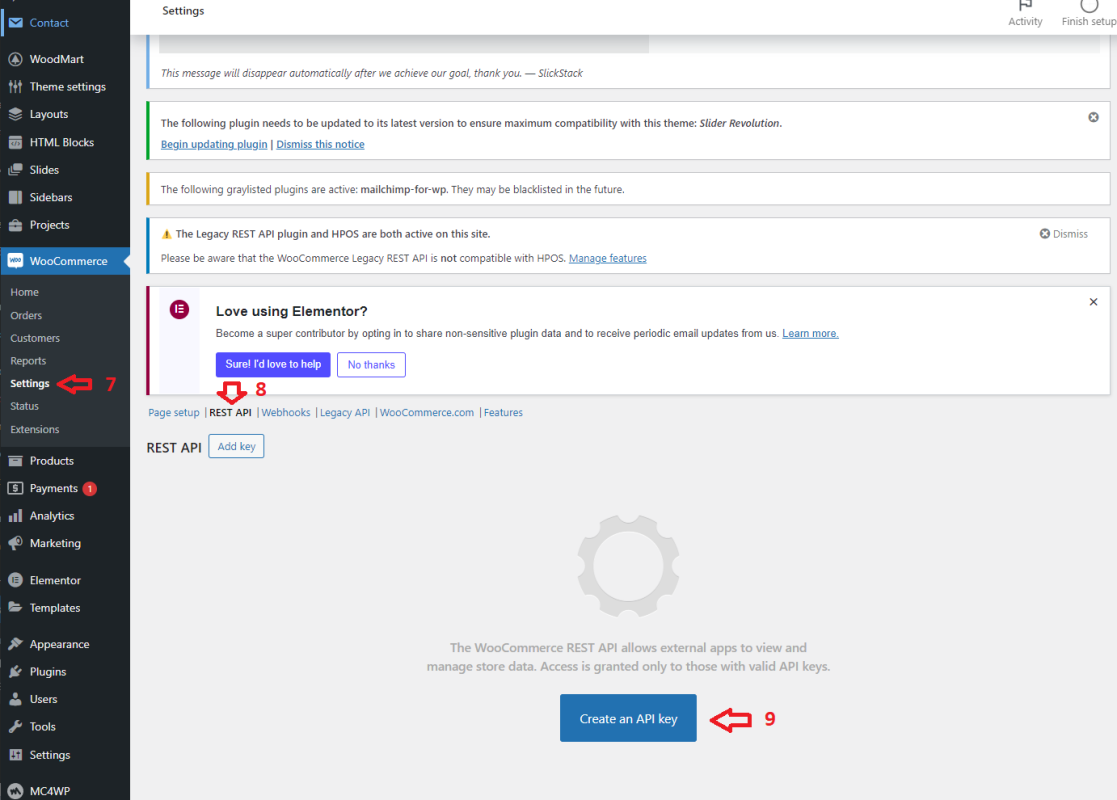
- Setting > Advanced
- REST API
- Create An API Key
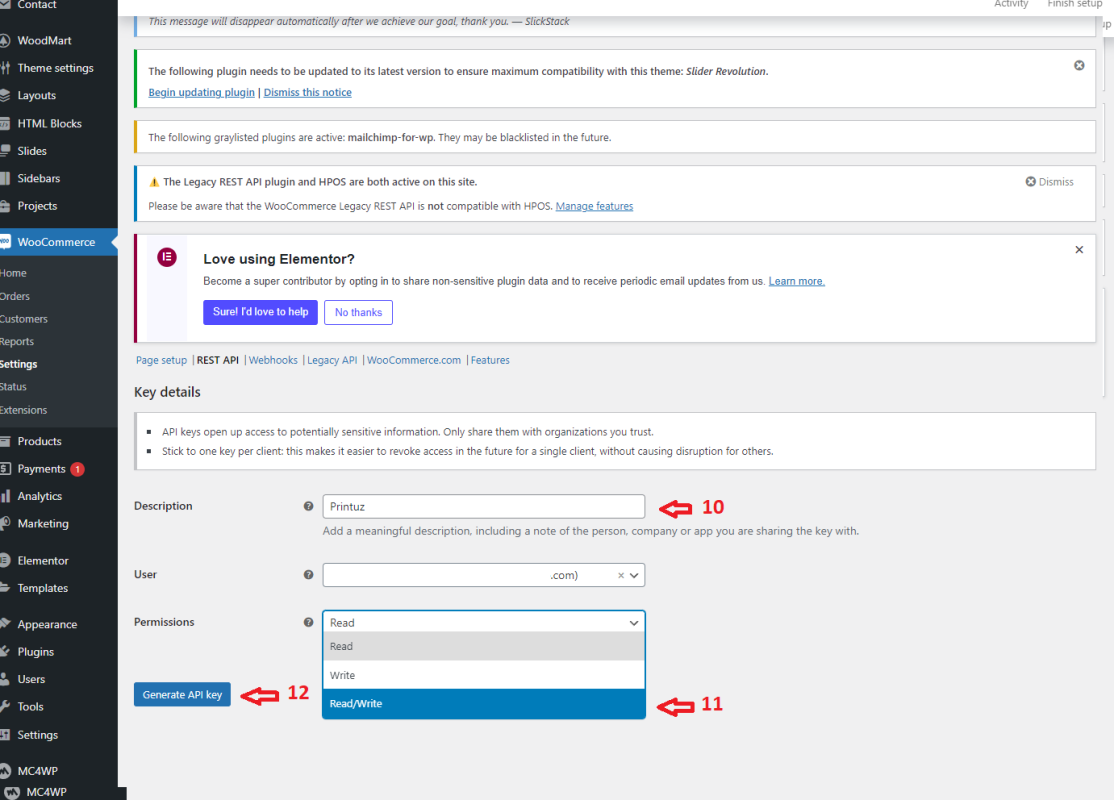
- Description : Printuz
- Permission : Chọn Read and Write
- Genarate API Key
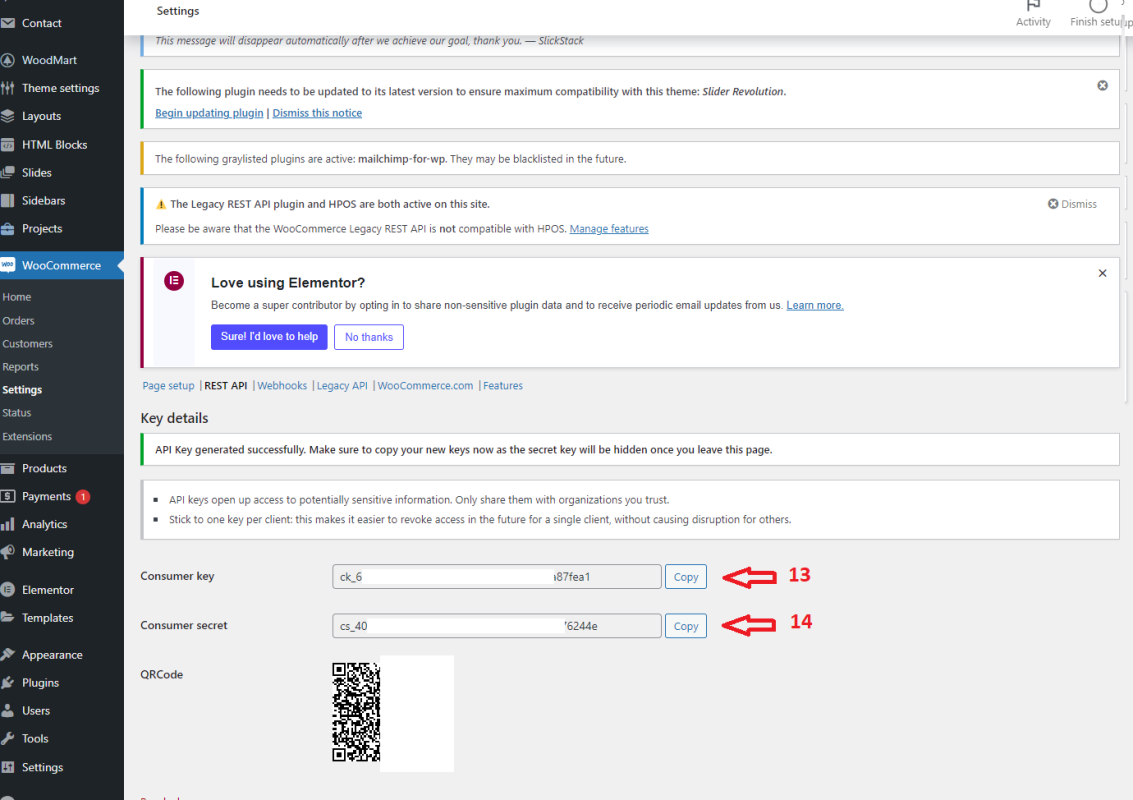
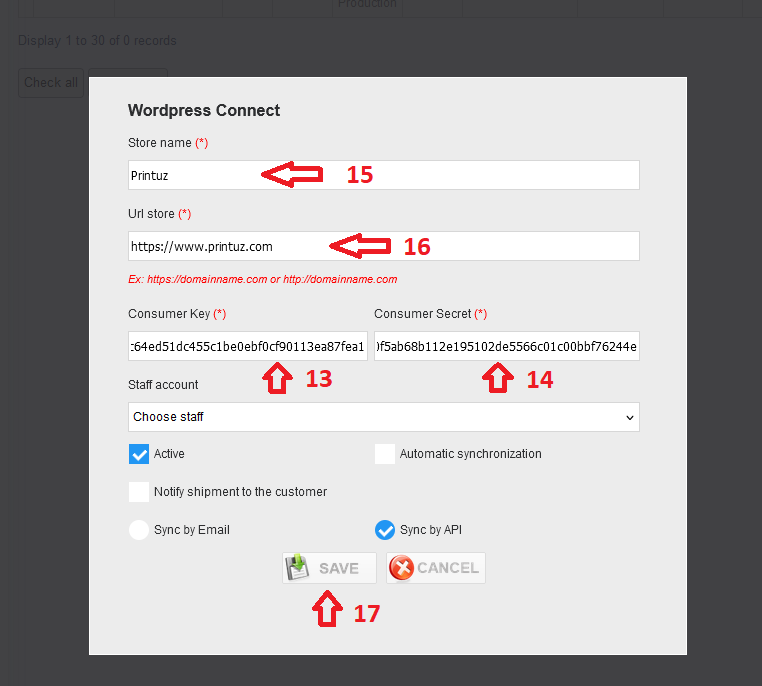
- Copy Consumer Key : Paste qua Printuz.
- Copy Consumer Secrect > Paste qua Printuz.
- Store name : tên hiển thị trên Printuz.
- Store URL : phải chính xác nhé.
- Save : Sau khi save thì mọi việc đã hoàn thành.
Sau các thao tác trên thì store của bạn đã connect vs Printuz, và hoàn toàn có thể tự động lấy đơn về Printuz để fulfill và tracking sẽ tự update lên store của bạn khi shipped.
Thanks for sharing. I read many of your blog posts, cool, your blog is very good. https://www.binance.com/uk-UA/register?ref=XZNNWTW7
Thanks for sharing. I read many of your blog posts, cool, your blog is very good. https://www.binance.com/zh-CN/register?ref=WFZUU6SI
Your article helped me a lot, is there any more related content? Thanks!
Your point of view caught my eye and was very interesting. Thanks. I have a question for you.
Good – I should definitely pronounce, impressed with your site. I had no trouble navigating through all tabs as well as related info ended up being truly easy to do to access. I recently found what I hoped for before you know it in the least. Reasonably unusual. Is likely to appreciate it for those who add forums or anything, web site theme . a tones way for your customer to communicate. Nice task..
I don’t think the title of your article matches the content lol. Just kidding, mainly because I had some doubts after reading the article. https://accounts.binance.info/ar-BH/register?ref=S5H7X3LP
Thank you for your sharing. I am worried that I lack creative ideas. It is your article that makes me full of hope. Thank you. But, I have a question, can you help me?
Your article helped me a lot, is there any more related content? Thanks! https://www.binance.info/register?ref=QCGZMHR6
Your article helped me a lot, is there any more related content? Thanks! https://www.binance.info/hu/register?ref=IQY5TET4
Can you be more specific about the content of your article? After reading it, I still have some doubts. Hope you can help me.
Thanks for sharing. I read many of your blog posts, cool, your blog is very good.
Thank you for your sharing. I am worried that I lack creative ideas. It is your article that makes me full of hope. Thank you. But, I have a question, can you help me?
Youre so cool! I dont suppose Ive learn something like this before. So good to seek out anyone with some unique ideas on this subject. realy thanks for beginning this up. this web site is something that is needed on the net, someone with somewhat originality. helpful job for bringing something new to the web!
When I originally commented I clicked the -Notify me when new comments are added- checkbox and now each time a comment is added I get four emails with the same comment. Is there any way you can remove me from that service? Thanks!
Thank you for your sharing. I am worried that I lack creative ideas. It is your article that makes me full of hope. Thank you. But, I have a question, can you help me?
Can you be more specific about the content of your article? After reading it, I still have some doubts. Hope you can help me. https://accounts.binance.bh/kz/register/person?ref=K8NFKJBQ
Thank you for your sharing. I am worried that I lack creative ideas. It is your article that makes me full of hope. Thank you. But, I have a question, can you help me?
Thanks for sharing. I read many of your blog posts, cool, your blog is very good.
Your article helped me a lot, is there any more related content? Thanks!
Thank you for your sharing. I am worried that I lack creative ideas. It is your article that makes me full of hope. Thank you. But, I have a question, can you help me? https://accounts.binance.info/register/person?ref=MBLCVVZG
Thanks for sharing. I read many of your blog posts, cool, your blog is very good.
Thank you for your sharing. I am worried that I lack creative ideas. It is your article that makes me full of hope. Thank you. But, I have a question, can you help me?
We are a bunch of volunteers and starting a new scheme in our community. Your web site offered us with helpful info to paintings on. You have done an impressive process and our entire community might be thankful to you.
Thanks for sharing. I read many of your blog posts, cool, your blog is very good.
Your point of view caught my eye and was very interesting. Thanks. I have a question for you.
Can you be more specific about the content of your article? After reading it, I still have some doubts. Hope you can help me. https://accounts.binance.com/register/person?ref=IHJUI7TF
Can you be more specific about the content of your article? After reading it, I still have some doubts. Hope you can help me.
Thanks for sharing. I read many of your blog posts, cool, your blog is very good.
I’ve been exploring for a little bit for any high-quality articles or weblog posts on this kind of space . Exploring in Yahoo I eventually stumbled upon this site. Reading this info So i am glad to express that I have an incredibly just right uncanny feeling I found out exactly what I needed. I most surely will make certain to don’t overlook this site and provides it a look regularly.
Thank you for your sharing. I am worried that I lack creative ideas. It is your article that makes me full of hope. Thank you. But, I have a question, can you help me? https://www.binance.com/register?ref=IHJUI7TF
Good write-up, I’m normal visitor of one’s website, maintain up the nice operate, and It is going to be a regular visitor for a long time.
I am always browsing online for tips that can assist me. Thank you!
I don’t think the title of your article matches the content lol. Just kidding, mainly because I had some doubts after reading the article.
Your point of view caught my eye and was very interesting. Thanks. I have a question for you.
Thanks for sharing. I read many of your blog posts, cool, your blog is very good. https://www.binance.bh/register?ref=QCGZMHR6
Can you be more specific about the content of your article? After reading it, I still have some doubts. Hope you can help me.
Your point of view caught my eye and was very interesting. Thanks. I have a question for you. https://www.binance.bh/register?ref=L4EUT9FG
Thank you for your sharing. I am worried that I lack creative ideas. It is your article that makes me full of hope. Thank you. But, I have a question, can you help me?
Thank you for your sharing. I am worried that I lack creative ideas. It is your article that makes me full of hope. Thank you. But, I have a question, can you help me?
Can you be more specific about the content of your article? After reading it, I still have some doubts. Hope you can help me.
Thanks for sharing. I read many of your blog posts, cool, your blog is very good.
Your article helped me a lot, is there any more related content? Thanks! https://accounts.binance.com/register/person?ref=IXBIAFVY
Thank you for your sharing. I am worried that I lack creative ideas. It is your article that makes me full of hope. Thank you. But, I have a question, can you help me?
Can you be more specific about the content of your article? After reading it, I still have some doubts. Hope you can help me. https://accounts.binance.bh/id/register-person?ref=UM6SMJM3
I don’t think the title of your article matches the content lol. Just kidding, mainly because I had some doubts after reading the article. https://www.binance.bh/register?ref=W49FLGDN